EventID 800
Configuration
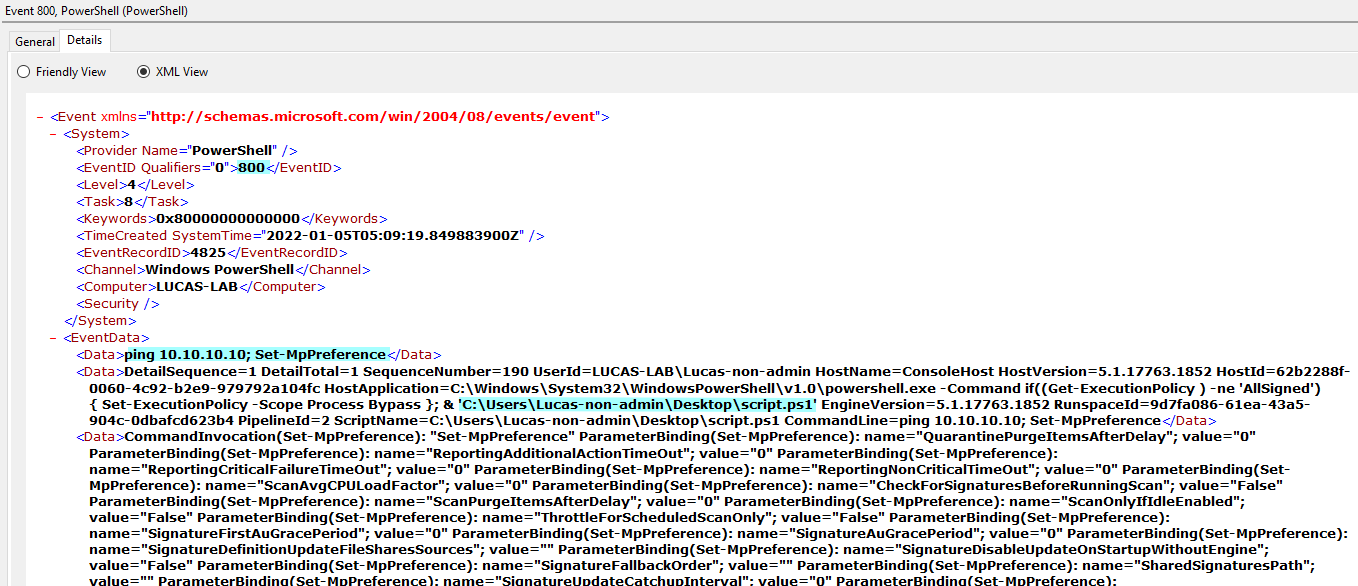
This Event logs Powershell's Module launched with powershell CLI or Powershell script. There are at least 2 methods for the powershell eventlog 800 activation.
Open
Computer Configuration/Administrative Templates/Windows Components/Windows PowerShell/Turn on Module Logging. CheckEnabledand add*inModule Name. Needs a reboot to be effective.This configuration stays after reboot and is effective on all users. (gpupdate /force didn't work on my side)
Open powershell and launch this command
Get-Module | ForEach {$_.LogPipelineExecutionDetails=$True}. Doesn't need a reboot to be effective.This configuration disappears after reboot and is effective only on user that launched command.
Note: The second method can be used by non-admin user to avoid Powershell module logging during its current session even when the 1st method is already configured.
Example


Link
- https://docs.microsoft.com/en-us/powershell/module/microsoft.powershell.core/about/about_eventlogs?view=powershell-5.1
- https://docs.microsoft.com/en-us/powershell/module/microsoft.powershell.core/about/about_group_policy_settings?view=powershell-7.2
- https://docs.microsoft.com/en-us/powershell/module/microsoft.powershell.core/about/about_modules?view=powershell-7.2